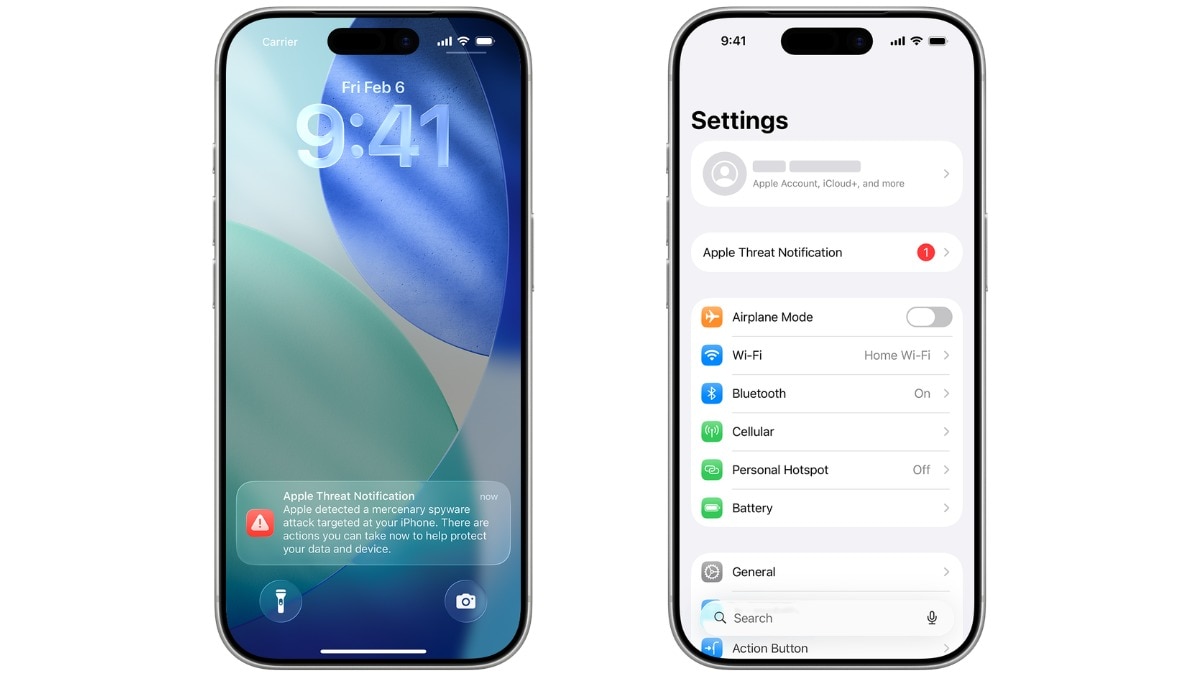
Apple has issued high‑confidence alerts to users it believes were individually targeted by mercenary spyware, now appearing directly on iPhone lock screens.
Key Takeaways
- Apple issued high‑confidence alerts to users in 110 countries.
- Alerts now appear on the iPhone lock screen and in Settings.
- Users are urged to enable Lockdown Mode and beware of phishing scams.
Apple’s New Threat Notification
In an updated support note released on August 13, Apple announced that it is sending threat notifications to individuals it believes have been targeted by mercenary spyware. These alerts now surface directly on the iPhone lock screen, ensuring immediate visibility.
What Is Mercenary Spyware?
Pegasus‑like spyware is highly targeted and often linked to state actors or private firms that develop it on their behalf. Journalists, activists, politicians, and diplomats have been among the victims. Apple stresses that it does not tie any specific alert to a particular attacker or region.
How Apple Detects It
Apple leverages its own threat‑intelligence and investigative teams to spot signs of a mercenary spyware infection, labeling them as “high‑confidence alerts.” The company does not disclose the exact criteria, fearing that such details could help spyware creators evade detection.
New Delivery Method
While Apple has been sending these warnings for years, the latest batch now appears on the lock screen and also in Settings. An email is sent to the Apple‑ID address, and a banner shows at the top of the account page after sign‑in.
Avoiding Scams
Apple warns that genuine alerts will never ask users to click a link, open a file, install an app, or share passwords. If users doubt an alert’s authenticity, they should sign in directly at account.apple.com rather than following any embedded links.
Historical Background
Since 2021, Apple has issued multiple rounds of threat notifications, reaching users in more than 150 countries. Pegasus, developed by NSO Group, was first publicly exposed in 2016 and has since been used by several governments, highlighting the growing relevance of Apple’s proactive approach.
Why This Matters
BozokMedia analysis shows that direct lock‑screen alerts dramatically increase user awareness, reducing the window for attackers to exploit compromised devices.
"Displaying high‑confidence alerts on the lock screen forces users to act immediately, a critical step in mitigating sophisticated spyware threats," says cyber‑security expert Dr. Maya Patel.
Frequently Asked Questions
Question 1: Can I disable these alerts?
Answer: Yes, but Apple advises against turning them off because they protect your device from serious threats.
Question 2: What should I do if I receive a suspicious email?
Answer: Delete the email immediately and verify the alert by signing into your Apple account through the official website.

